Minggu, 13 Mei 2012

How to make an automatic Carousel slider based on labels?

In this tutorial I will discuss how to create automatic Carousel slider based on your labels in blogger. All you have to do only replace with your own label and the slider will work based on the label that you add in Edit HTML template. I made this carousel slider was very simple and only used jCarousellite script without adding easing effects or mousewheel.

carousel slider johny

  1. You must login to blogger with your account
  2. After that select the blog that you want to add slider.
  3. Go to the template >> Edit HTML and check the expand widget templates, don't forget to backup your template first.
  4. And then place this following codes above ]]></b:skin>:
    #carousel{width:950px;height:185px;margin-bottom:0px;position:relative;display:block}
    #carousel .container{position:absolute;left:49px;width:895px;height:185px;overflow:hidden;background:url(https://blogger.googleusercontent.com/img/b/R29vZ2xl/AVvXsEiPGmfEv3YfbiMT8oeMOSbsl0-6vRR2vUGCZvMPK0lkuUWUFD3e-vOxKwbo-T1hmXfWWD79byP7nddPcDfiWR46j985-1djUAy4jcI5zUtsQ6dhJJvc_sCdOn9dq-egx2XweMBjGNjrqEI/s1600/scroller-bg.png) repeat center}
    #carousel #previous_button{position:absolute;width:49px;height:185px;background:url(https://blogger.googleusercontent.com/img/b/R29vZ2xl/AVvXsEguIp_qvA7m-p78rp7p4ei-tF-8gmheH8jZruwtoZbSOmmBzjVZdglgjsERwFpvKCafTNDum9OU7N2Ck3tT_pUeBDPQ-iiZJmbqFm2JUiUiLL_sitGqZkzAVz9lHWCYcGX5sjwTPzseeTc/s1600/prev.png) center;z-index:100;cursor:pointer;border-right:1px solid #ccc}
    #carousel #previous_button:hover{background:url(https://blogger.googleusercontent.com/img/b/R29vZ2xl/AVvXsEgOIP3nbqZBIRU3C1HRhD1jdxk2Jn__edBSxSrMkzvnBkkSsndvL0zjC17kK5oV_F4pKDV8CFJgyr3JKmA0mWib11cvQ4xC0JejX7F4xie1OeqO-_qkz46ansdVfS3LdLW8H9_Sce_n0yk/s1600/prev.png) center}
    #carousel #next_button{position:absolute;right:0;width:49px;height:185px;background:url(https://blogger.googleusercontent.com/img/b/R29vZ2xl/AVvXsEgcYmtmMRI2OTkXzySoKkEA918aCeMbZXKU2G7OeBbWNd4e3rYvRYnxdF9dtXXf7tHJ95WE4AbHF64H6MTcr7NjH-ImeHWngXlyAnO_Q28ADYzXIITwIkfgDJLYVa0MbxnWqvKrpi4pl6U/s1600/next.png) center;z-index:100;cursor:pointer;border-left:1px solid #ccc}
    #carousel #next_button:hover{background:url(https://blogger.googleusercontent.com/img/b/R29vZ2xl/AVvXsEiZOcv5NJTSakxuRYdCBCrII0w5PD7jvpAx_t-BkMi_qK7Ww9_nnWYfAyUz2YmnNj-_Um9XuA-8-POoI0YGlQWSVJKTf-Kxp4SH_ohIWu2FWPN5U-4AdW0pW91Vub9J_1iwxWQOF_zT0XQ/s1600/next.png) center}
    #carousel ul{width:100000px;position:relative;margin-top:10px}
    #carousel ul li{background:#fff url(https://blogger.googleusercontent.com/img/b/R29vZ2xl/AVvXsEgEIlnmdBvi_yZrdIW2YfZWwplcQPTBH4A743CkgazhREdvJDTCrlBmHBjMWCVhhClvDnJIu2syDmLyjbQ3DOHrewvYXyvoRPgFJxD8wT8FfXuSg9KuJuZrqJyhA1_vAqAuH1jGSTRnLB8/s1600/main.png) repeat-x top;display:inline;float:left;text-align:center;font-weight:700;font-size:.9em;line-height:1.2em;border:1px solid #ccc;width:145px;height:150px;margin:0 4px 20px 7px;padding:6px;-webkit-border-radius:4px;-moz-border-radius:4px;border-radius:4px;}
    #carousel ul li:hover{filter:alpha(opacity=75);opacity:.75;}
    #carousel ul li a.slider_title{color:#222;display:block;margin-top:5px}
    #carousel ul li a.slider_title:hover{color:#cd1713}
    #carousel a img{display:block;background:#fff;margin-top:0}
    Look at some codes with the blue color above, that's the width and height of the slider in the demo that I made, change with your own size depend on your template width.
  5. Still in Edit HTML, add this following code above </head> :
    <script src='http://ajax.googleapis.com/ajax/libs/jquery/1.7.2/jquery.min.js' type='text/javascript'/>
    <script src='https://masolis-javascript.googlecode.com/svn/trunk/carousellite.js' type='text/javascript'/>

    <script type='text/javascript'>
    //<![CDATA[
    imgr = new Array();
    imgr[0] = "https://blogger.googleusercontent.com/img/b/R29vZ2xl/AVvXsEhY0OHJEQE2QOQK41wGQYUcIioQEaVasduWHR9Mq32inLXHddhOdRynpFOFTkzR08PuvykEtBAXB4Ky5-GOHbEGMRiwKMDquf80DWlnp0DwzpMKdu47bAP7CCXmTIfRJE4BBNzx_vQhyII/s1600/no+image.jpg";
    showRandomImg = true;

    aBold = true;

    summaryPost = 140;
    summaryTitle = 25;

    numposts1 = 15;
    label1 = "news";

    function removeHtmlTag(strx,chop){
    var s = strx.split("<");
    for(var i=0;i<s.length;i++){
    if(s[i].indexOf(">")!=-1){
    s[i] = s[i].substring(s[i].indexOf(">")+1,s[i].length);
    }
    }

    s = s.join("");
    s = s.substring(0,chop-1);
    return s;
    }
    function showrecentposts(json) {
    j = (showRandomImg) ? Math.floor((imgr.length+1)*Math.random()) : 0;
    img = new Array();
    document.write('<ul>');
    for (var i = 0; i < numposts1; i++) {
    var entry = json.feed.entry[i];
    var posttitle = entry.title.$t;
    var pcm;
    var posturl;
    if (i == json.feed.entry.length) break;
    for (var k = 0; k < entry.link.length; k++) {
    if (entry.link[k].rel == 'alternate') {
    posturl = entry.link[k].href;
    break;
    }
    }

    for (var k = 0; k < entry.link.length; k++) {
    if (entry.link[k].rel == 'replies' && entry.link[k].type == 'text/html') {
    pcm = entry.link[k].title.split(" ")[0];
    break;
    }
    }

    if ("content" in entry) {
    var postcontent = entry.content.$t;}
    else
    if ("summary" in entry) {
    var postcontent = entry.summary.$t;}
    else var postcontent = "";
    postdate = entry.published.$t;
    if(j>imgr.length-1) j=0;
    img[i] = imgr[j];
    s = postcontent ; a = s.indexOf("<img"); b = s.indexOf("src=\"",a); c = s.indexOf("\"",b+5); d = s.substr(b+5,c-b-5);
    if((a!=-1)&&(b!=-1)&&(c!=-1)&&(d!="")) img[i] = d;
    //cmtext = (text != 'no') ? '<i><font color="'+acolor+'">('+pcm+' '+text+')</font></i>' : '';
    var month = [1,2,3,4,5,6,7,8,9,10,11,12];
    var month2 = ["Jan","Feb","Mar","Apr","May","Jun","Jul","Aug","Sep","Oct","Nov","Dec"];
    var day = postdate.split("-")[2].substring(0,2);
    var m = postdate.split("-")[1];
    var y = postdate.split("-")[0];
    for(var u2=0;u2<month.length;u2++){
    if(parseInt(m)==month[u2]) {
    m = month2[u2] ; break;
    }
    }

    var daystr = day+ ' ' + m + ' ' + y ;
    var trtd = '<li class="car"><div class="thumb"><a href="'+posturl+'"><img width="145" height="100" class="alignnone" src="'+img[i]+'"/></a></div><p><a class="slider_title" href="'+posturl+'">'+posttitle+'</a></p></li>';

    document.write(trtd);
    j++;
    }
    document.write('</ul>');
    }
    //]]>
    </script>
    Notes:
    See the red URL script above, that's the latest series jQuery.min.js script code that I use to made this slider. And if you've found jQuery.min.js although with the different series in your template, the red codes no longer need to insert. There must be only one jQuery.min.js in your template, it is up to the serial number, if possible the latest version.
    Blue code (15) : amount of your post that display in the slider. news was a label that I choose to show up in slider.
  6. Next step you must call the slider to appear in your blog. Place this following code above <div id='main-wrapper'>:
    <b:if cond='data:blog.pageType != &quot;item&quot;'>
    <div id='carousel'>
    <div id='previous_button'/>
    <div class='container'>
    <script>
    document.write(&quot;&lt;script src=\&quot;/feeds/posts/default/-/&quot;+label1+&quot;?max-results=&quot;+numposts1+&quot;&amp;orderby=published&amp;alt=json-in-script&amp;callback=showrecentposts\&quot;&gt;&lt;\/script&gt;&quot;);
    </script>   
    <div class='clear'/>
    </div>
    <div id='next_button'/>
    </div>
    <script type='text/javascript'>
    (function($) {     $(document).ready(function(){
    $(&quot;#carousel .container&quot;).jCarouselLite({
        auto:4000,
        scroll: 1,
        speed: 800,   
        visible: 5,
        start: 0,
        circular: true,
        btnPrev: &quot;#previous_button&quot;,
        btnNext: &quot;#next_button&quot;
        });
        })})(jQuery)   
    </script>
    </b:if>
    You can also put the following codes in the bottom of your navigation menu or you can also placed in your footer side, that's depend on your needs.
  7. The final step, save templates and see the results.

Sabtu, 12 Mei 2012

3 Style Johny Storage Template Blogger

These 3 template was only modified from my previous version in Amazing Magazine Template Blogger for your portal site. I modified those template with 3 colors choosen in dark, blue and red color; and add some additional widget in the middle of this template.

Johny Storage Dark


Johny Storage Blue


Johny Storage Red


For more detail about how to use this template plese visit this link, translate it n English with widget translation flag in the top of sidebar.

Minggu, 06 Mei 2012

Download Blogger Templates Photography Free 2012

Download Blogger Templates Photography Free 2012

Download Blogger Template for Best Photography Photos 2012 is a downloadable template for Photography Template. Now another season of photographers to find the best moment to shown on their blog. too bad if their brilliance in Photography process is not balanced with the knowledge about the world of bloggers, by bloggers because they can display their works in cyberspace so that the whole world to know the work of the Photography.

Photography provided a template blogger template is different than other Photos, namely Blogger Template Magazine 2012, Best Free Blogger Template Download 2012, Download Cool Free Blogger Template Latest 2012, and others. Photography templates for designnya more prominent in the display image on the homepage and there is a column, and usually use 2 column blogger template

Below is a free Template Blogger for Photography for download. by:btemplates.com

1. MyFolio

live demo


2. Gallery Hex

live demo

DOWNLOAD


3. MadKassar

live demo

DOWNLOAD


4. Primal

live demo

Senin, 30 April 2012

Download Magazine Blogger Template Free 2012

Download Magazine Blogger Template Free 2012

Template Style Magazine was not lost on Blogger to accommodate the interest of their story. These templates are usually reserved for those who like to read about the syle, fashion, news, etc.. Size is usually larger than the others because to make it easier for readers if you want to access other posts provided by the author.

Magazine Blogger Templates provided on this blog is clearly different from the previous post Best Blogger Template 2012, Cool and Blogger Templates Free Templates. The difference is obvious in the design that is wider and has more than 2 columns and size that is wider than the other. by: Borneo Templates


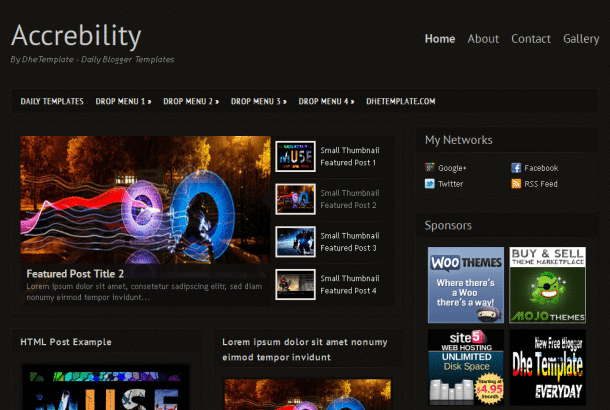
1. Accrebility


2. Cellar


3. Easy Magazine


4. Media Online


5. Sporty Magazine 2 Free


Amazing Magazine Template Blogger for your portal site

Johny Storage

This template was designed especially for portal news content, with many features to easily navigated your site. As in Mas Paper 2 and Gamer Darkpaper template, Johny Storage also completely automatic. You just enter the label and script code in HTML / Javascript box, and then the features on this template will display automatically.


Many features in this template :
  1. It's a 2/3 column blogger template with right sidebar
  2. 3 column footer
  3. Automatic featured content slider
  4. Automatic slider carousel
  5. Ads and pagination for blogger ready
  6. Dropdown menu, tab view menu, clean design template
  7. Static Page ready.
  8. and more.
To installlation and instruction how to use this template, please visit this link for more detail.


Johny Simplemag

Johny Simplemag template was designed with automatic slider and all widgets work more dynamic. Installed simple Yahoo Slider here, there was only 4 posts can be displayed on the slider, but the display remains the same.


More features :
  1. It's a 3 column blogger template with one right sidebar
  2. 3 column footer and magazine style blogspot template
  3. Automatic simply Yahoo slider
  4. Ads ready, pagination for blogger ready
  5. Dropdown menu,
  6. Related post ready in the bottom of every post, clean design template
  7. Static Page ready
  8. and more.
Please visit this link for more detail and instruction how to use this template